What is TPMS and Why It Matters
TPMS — Tire Pressure Monitoring System — has been federally mandated on all passenger vehicles sold in the United States since 2007. The system monitors tire pressure in real time and alerts the driver when any tire drops below a safe threshold, typically 25% below the placard pressure.
For shops and tire dealers, TPMS is no longer a specialty service — it's a routine part of every tire job. Understanding how to properly program, clone, and relearn TPMS sensors is essential for any technician who touches wheels.
Types of TPMS: Direct vs Indirect
Direct TPMS
Direct TPMS uses a physical sensor mounted inside each tire, typically attached to the valve stem or banded to the wheel rim. Each sensor contains a pressure transducer, temperature sensor, battery, and radio transmitter. The sensor broadcasts its data to a receiver module in the vehicle, which displays the information on the dash.
Direct TPMS sensors are what you'll be programming and servicing. Each sensor has a unique ID that must be registered (learned) to the vehicle's TPMS module so the car knows which sensor belongs to which wheel position.
Indirect TPMS
Indirect TPMS doesn't use dedicated sensors. Instead, it uses the ABS wheel speed sensors to detect differences in rotational speed caused by underinflated tires (which have a smaller rolling radius). Indirect systems require a reset procedure after tire service but don't involve physical sensor programming.
The vast majority of vehicles on the road use direct TPMS. That's what this guide focuses on.
When Do You Need to Program TPMS Sensors?
TPMS programming is required in several common scenarios:
- Installing new aftermarket sensors: When an OEM sensor fails or a customer wants universal sensors, the new sensor must be programmed with the correct protocol for the vehicle.
- Cloning a sensor: Copying the ID from an existing sensor to a new one — the vehicle doesn't know the sensor was replaced, so no relearn is needed.
- Tire rotation on some vehicles: Certain vehicles (many Toyotas, for example) require sensor IDs to be reassigned to new wheel positions after rotation.
- Seasonal tire swaps: Moving between summer and winter wheel sets means the vehicle needs to learn a new set of sensor IDs.
- Sensor replacement: Dead batteries, physical damage, or corrosion all necessitate new sensors and fresh programming.
Step-by-Step TPMS Programming with Autel Tools
Here's the general workflow for programming a TPMS sensor using an Autel TPMS tool:
Step 1: Identify the Vehicle
Select the vehicle year, make, and model on your Autel tool. The tool will display the correct sensor protocol, frequency (315 MHz or 433 MHz), and any vehicle-specific requirements.
Step 2: Read the Existing Sensors
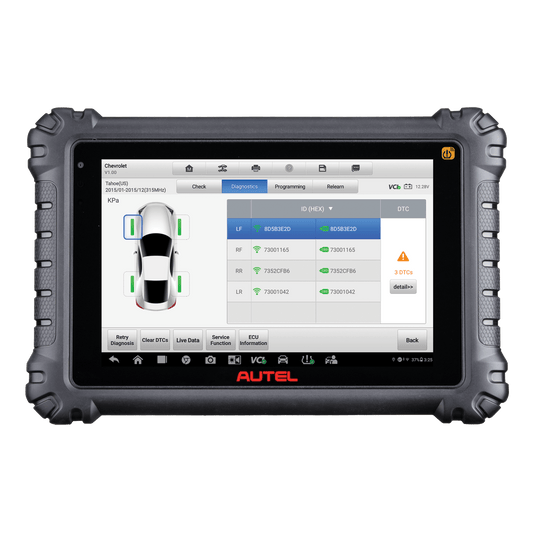
Use the tool's "Read" or "Trigger" function to activate and read each installed sensor. The tool will display the sensor ID, pressure, temperature, battery status, and frequency. This step tells you what you're working with — and whether the existing sensors are still functional.
Step 3: Program the New Sensor
If you're using an Autel MX-Sensor (or other programmable universal sensor), place the new sensor near the tool's antenna and select "Program." You have several options:
- Auto Create: The tool generates a new unique ID and programs the sensor with the correct protocol for the vehicle.
- Copy by Activation: The tool reads the old sensor's ID and copies it to the new sensor (cloning). This is the fastest method because the vehicle already recognizes the ID.
- Copy by Input: Manually enter a sensor ID to program. Useful when the old sensor is too damaged to read.
Step 4: Install the Sensor
Mount the programmed sensor to the wheel, install the tire, and inflate to spec.
Step 5: Perform the Relearn Procedure
If you didn't clone the old sensor's ID, the vehicle needs to learn the new sensor. This is the relearn procedure — covered in detail below.
MX-Sensor vs OEM Sensors: Pros and Cons
Autel's MX-Sensor is a universal programmable TPMS sensor that can replace OEM sensors for most vehicles on the road. Here's how they compare:
| Factor | Autel MX-Sensor | OEM Sensor |
|---|---|---|
| Cost | $15-$25 per sensor | $40-$120 per sensor |
| Vehicle Coverage | Covers 99%+ of vehicles (1 SKU for 315 MHz, 1 for 433 MHz, or dual-frequency) | Vehicle-specific — dozens of part numbers |
| Inventory | 2-3 SKUs covers everything | Need dozens of part numbers in stock |
| Programming Required | Yes — must program to vehicle protocol | No — pre-programmed from factory |
| Quality | High — comparable battery life and accuracy | OEM specification |
| Customer Perception | Some customers prefer OEM | Perceived as "original" |
For most shops, MX-Sensors are the practical choice. The cost savings are substantial, the inventory simplification is huge, and the end result — a properly functioning TPMS system — is identical. Stock a box of 315 MHz and a box of 433 MHz MX-Sensors and you can handle virtually any vehicle that comes through your door.
TPMS Relearn Procedures Explained
After installing sensors with new IDs (not cloned), the vehicle's TPMS module must learn which sensor is in which position. There are three types of relearn procedures:
Stationary Relearn (OBD-Based)
The most reliable method. Connect your Autel tool to the vehicle's OBD-II port and use the TPMS relearn function. The tool writes the new sensor IDs directly to the TPMS module. The vehicle instantly recognizes the sensors in their correct positions. Most Asian and domestic vehicles support this method.
Active (Trigger) Relearn
The vehicle is put into "learn mode" using a specific procedure (often a combination of key cycles, button presses, or a menu option). Then you use the TPMS tool to trigger each sensor in sequence — left front, right front, right rear, left rear. The vehicle's horn chirps or lights flash to confirm each sensor is learned.
Auto Relearn (Drive Relearn)
Some vehicles (many GM and Ford models) will automatically relearn sensor IDs after driving for 10-20 minutes at speeds above 15-25 mph. This is the simplest method but takes the longest and doesn't confirm wheel positions immediately.
Your Autel TPMS tool tells you exactly which relearn procedure each vehicle requires. Follow the on-screen instructions — the tool takes the guesswork out of the process.
Troubleshooting Common TPMS Issues
- TPMS light stays on after service: Most common cause is an incomplete relearn. Verify all four sensors are triggering and the relearn procedure was completed for all positions.
- Sensor won't trigger: Dead battery is the most common cause. If the sensor is new, verify it's been programmed to the correct protocol and frequency for the vehicle.
- Intermittent TPMS light: Often caused by a weak sensor battery that can't transmit reliably at all temperatures. Sensor replacement is the fix.
- Wrong pressure readings: Verify the sensor is programmed to the correct protocol. Some vehicles have multiple TPMS protocol options — the tool should identify the correct one.
- Sensor ID conflict: If two sensors on the same vehicle have identical IDs (rare, but happens with cloning errors), the system will malfunction. Reprogram one sensor with a new unique ID.
Best Autel TPMS Tools by Use Case
Autel offers several TPMS tools at different price points. Here's which one fits your operation:
Tire Shops and High-Volume Tire Dealers
Autel TS608: Full TPMS functionality plus basic diagnostic capabilities. Programs MX-Sensors, performs all relearn types, and includes OBD-II relearn through the diagnostic connection. Ideal for shops where TPMS is a primary service.
General Repair Shops
Autel MaxiSys with TPMS module: If you already own a MaxiSys tablet (MS906 Pro, MS909, Ultra II), add the TPMS accessory module. This gives you full TPMS capability integrated into your existing diagnostic platform — no need for a separate tool.
Mobile Technicians
Autel TS508: Compact, affordable, and covers all the essential TPMS functions. Programs sensors, performs relearns, and fits in a tool bag. The best value for mobile tire service operations.
Frequently Asked Questions
How do I know if a TPMS sensor battery is dead?
Use your Autel TPMS tool to trigger the sensor. If it doesn't respond, the battery is likely dead. Most TPMS sensors have a battery life of 5-7 years. The tool will also display battery status (Good, Low, Critical) for sensors that do respond.
Can I clone a TPMS sensor to avoid the relearn procedure?
Yes. Cloning copies the old sensor's ID to the new sensor. Since the vehicle already recognizes that ID, no relearn is needed. This is the fastest method and works in most situations. Your Autel tool's "Copy by Activation" function handles this.
Do I need a TPMS tool for tire rotations?
It depends on the vehicle. Some vehicles (many Toyotas, Lexus, and some Chrysler products) require the TPMS system to be updated with new wheel positions after rotation. Others auto-relearn after driving. A TPMS tool lets you handle every vehicle correctly.
What's the difference between 315 MHz and 433 MHz sensors?
These are the two radio frequencies used by TPMS sensors. North American domestic and Asian vehicles predominantly use 315 MHz. European vehicles typically use 433 MHz. The Autel MX-Sensor is available in both frequencies, and a dual-frequency version covers both.
Can I program any universal sensor, or only Autel MX-Sensors?
Autel TPMS tools are optimized for Autel MX-Sensors, which offer the broadest vehicle coverage and most reliable programming results. Other universal sensors may work with Autel tools, but compatibility varies. For guaranteed results, MX-Sensors are the recommended choice.
How many MX-Sensor SKUs do I need to stock?
As few as two: one 315 MHz and one 433 MHz. The dual-frequency MX-Sensor reduces that to a single SKU. This is one of the biggest advantages over OEM sensors, which require dozens of different part numbers. Check our TPMS sensor inventory for current options.
What happens if I install a TPMS sensor without programming it?
An unprogrammed universal sensor won't communicate with the vehicle. The TPMS warning light will remain on and the system will show missing or malfunctioning sensors. Always program universal sensors before installation.
Recommended TPMS Tools
- Autel MaxiTPMS TS900 — Professional 8-inch tablet with complete TPMS diagnostics and programming
- Autel TS508 Wi-Fi Kit with 4 Sensors — Great mid-range TPMS tool with included MX-Sensors
- Autel MaxiTPMS TS900K-8 Kit — Complete TS900 kit with 8 sensors
- Autel MX-Sensor BLE (Tesla Ready) — Universal programmable TPMS sensor with BLE support